If your Meta (Facebook and Instagram) product ads aren’t delivering the results you want, the problem often lies in your product feed data. This feed is the foundation Meta uses to show the right products to the right people at the right time. When your feed is accurate, detailed, and well-organized, Meta’s ad system can create personalized and relevant ads that connect with potential buyers. On the other hand, a poorly maintained feed—missing key details, outdated, or inconsistent—can lead to wasted ad spend and missed opportunities. Using your Meta product feed effectively is one of the quickest ways to boost your ad targeting and overall campaign performance without changing your entire marketing strategy.
What exactly is Meta product feed data and why should I care?
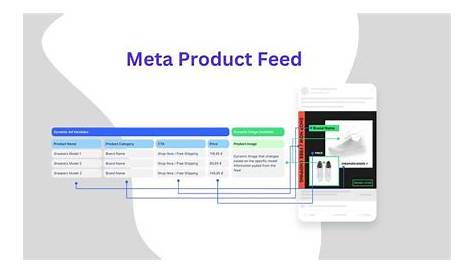
Meta product feed data is a structured file containing detailed information about your products—things like names, prices, descriptions, images, availability, and identifiers. This feed links directly to your Meta catalog, which acts as the inventory pool for your ads on Facebook and Instagram. When you run product ads, Meta draws from this catalog to display products to users. The quality of your feed determines how well Meta can match your items to people based on their interests, shopping habits, and demographics. If your feed lacks important data or has errors, your ads may show irrelevant products or miss potential customers entirely. Paying attention to your product feed means giving your ads the accurate, rich data they need to work effectively and drive sales.
Which parts of my product feed actually influence ad targeting?
Not all data in your product feed impacts targeting equally, but several key attributes stand out. Titles and descriptions are crucial because Meta uses this text to understand what each product is and who might want it. Clear, keyword-relevant titles and descriptions help your products appear in the right searches and interest groups. Categories and product types guide Meta’s classification system, helping place your ads in front of users browsing similar items. Availability and pricing affect whether your ads can run and how attractive your products look—showing out-of-stock items can frustrate shoppers and hurt ad performance. Including high-quality images and accurate product identifiers like GTINs or MPNs (when applicable) confirms product authenticity and uniqueness, further improving targeting accuracy.
How does Meta use this feed data to personalize ads dynamically?
Meta’s Dynamic Ads use your product feed to tailor ad content for each individual user. Instead of showing the same ad to everyone, Dynamic Ads automatically select products based on a person’s behavior—such as items they viewed, added to their cart, or products similar to previous purchases. Your feed provides the essential details—images, prices, descriptions—that Meta uses to build these personalized ads. This approach lets users see products they are more likely to be interested in without you having to create separate ads for every product or audience. The better your feed data, the smarter and more relevant these dynamic ads become, boosting your campaign’s performance.
What common mistakes do marketers make with their product feeds?
Many marketers don’t realize how strict Meta’s system is about product feed quality. Common errors include outdated info like old prices or products no longer available still appearing in the feed. Inconsistent formatting, such as mixing currencies or measurement units, can confuse Meta and reduce ad effectiveness. Missing critical data—titles, availability, images—can cause products to be disqualified or ignored. Some marketers overstuff titles and descriptions with irrelevant keywords hoping to increase reach; this usually backfires by making ads look spammy and lowering click-through rates. Ignoring seasonal changes or promotions in your feed can also limit your ability to connect with shoppers at the right time.
How can I audit and improve my product feed quality?
Start by exporting your feed and checking for obvious issues like missing fields, broken links, outdated prices, or out-of-stock products. Use Meta’s Catalog Manager tools to flag errors, which can highlight formatting problems or missing data. Then, standardize your feed so information is consistent—use the same currency throughout, categorize products precisely, and write clear, concise titles without keyword stuffing. Enhance your feed with detailed descriptions that explain product benefits and features. Make sure your images are high-quality and clearly show the product. Finally, set up a regular update schedule to keep prices, availability, and promotions current. This process helps you catch and fix problems that drag down ad performance.
What role do custom labels and product sets play in targeting?
Custom labels let you add your own tags to products beyond Meta’s standard categories. For example, you might label items by season, profit margin, or promotion status. These labels help you create product sets—groups of products you can target specifically in campaigns. If you want to run a campaign just for clearance items or best sellers, custom labels make it easy. Product sets control which products appear in your ads, allowing you to tailor your messaging and bids more precisely. This focused targeting helps you avoid wasting budget on irrelevant products and concentrate on those most likely to deliver results.
How can I use feed data insights to optimize my ad campaigns?
Once your product feed is accurate and up to date, use Meta's reporting tools to see how individual products perform in your campaigns. You can identify which items get the most clicks, conversions, or engagement. If certain products underperform consistently, try improving their titles, descriptions, images, or pricing to make them more appealing. Look for trends in categories or types of products that resonate best with your audience and adjust your product sets or targeting accordingly. Combining feed data with user behavior insights lets you refine both what products you show and who sees them. Over time, this ongoing adjustment will make your ads more effective and cost-efficient.
Are there advanced feed strategies that can boost performance?
Beyond the basics, some advanced strategies can improve your feed’s impact. Automating feed updates through APIs or third-party tools keeps your catalog fresh without manual work. Plan seasonal updates to swap in holiday-themed products or special offers timed for shopper interest. Including external data like real-time inventory, promotional discounts, or shipping details can make your ads more accurate and appealing. Some marketers use custom labels with metrics like profit margin or stock velocity to prioritize high-value products in ads. These approaches take more setup but can significantly increase ad relevance and efficiency.
How do feed updates and sync frequency impact ad delivery?
How often you update your product feed matters because Meta needs current data to decide which products to show. If your feed isn’t refreshed regularly, users might see ads for items that are out of stock or no longer available, wasting impressions and lowering conversion rates. Ideally, update your feed daily or even multiple times per day if your inventory or prices change often. For more stable inventories, weekly updates may be enough. The goal is to keep data accurate and timely without overloading your system. Ignoring feed freshness risks hurting your ad results and frustrating potential customers.
What’s the easiest way for me to get started improving my Meta product feed right now?
Start by logging into Meta’s Catalog Manager and reviewing your current product feed for missing or outdated information. Fix any flagged errors, especially around titles, prices, and availability. Ensure your images are high quality and consistent. Clean up product titles and descriptions—make them clear, concise, and relevant without keyword stuffing. Try creating a product set using custom labels to segment your catalog, then test a Dynamic Ads campaign focused on that set. Watch how those ads perform and adjust your feed based on what you learn. This straightforward, hands-on approach lets you improve your feed quickly and see better results without complicated tools or technical skills.
Conclusion
Focus first on cleaning up the core parts of your product feed: titles, descriptions, prices, availability, and images. Don’t worry about advanced tricks until your data is accurate and complete. When your feed is solid, your ads will show the right products to the right people, leading to better engagement and more sales without raising your budget. Keep your feed updated regularly and use Meta’s tools to catch issues early. Once you’ve nailed the basics, you can explore custom labels, automation, and enhanced data for even better performance. Start small and steady—you’ll likely see noticeable improvements just by giving Meta better product data to work with.
Frequently Asked Questions
How often should I update my Meta product feed?
Keep your feed updated as often as your inventory or prices change. If changes happen regularly, daily or multiple updates per day work best. For more stable catalogs, weekly updates may be enough. The key is avoiding ads for out-of-stock or outdated products.
Can I use product feed data for retargeting campaigns?
Yes. Product feed data is essential for retargeting with Dynamic Ads. Meta uses the feed to show users the exact products they viewed or interacted with, increasing the chances they’ll return and purchase.
What happens if my product feed has missing or incorrect information?
Missing or incorrect data can cause your products to be disqualified or shown to the wrong audience, reducing ad effectiveness and wasting budget. Keeping your feed complete and accurate is critical for good results.
Are custom labels necessary for all Meta product feeds?
No, custom labels aren’t required but they’re very helpful if you want to segment your catalog and run more targeted campaigns. They let you group products by your own attributes like seasonality or profit margin, making your ads more precise.
How do Dynamic Ads differ from regular product ads?
Dynamic Ads pull products automatically from your feed and personalize what each user sees based on their behavior and interests. Regular product ads are usually static and don’t change depending on who sees them. Dynamic Ads depend heavily on having a high-quality product feed.