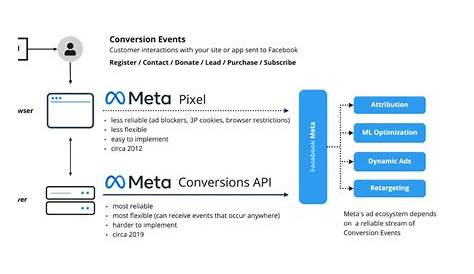
If you’re currently using Facebook Pixel to track your ads, switching to or adding Meta Conversion API can improve your tracking accuracy and campaign results. Unlike Pixel, which depends on browser behavior, Conversion API sends conversion data directly from your server to Meta. This server-side approach makes tracking more reliable, less affected by ad blockers or privacy restrictions, and better aligned with privacy regulations. You don’t have to stop using Pixel—combining both often delivers the best insight. Understanding how Conversion API works and its advantages helps you decide if it’s right for your marketing efforts.
What exactly is the Meta Conversion API and how is it different from Facebook Pixel?
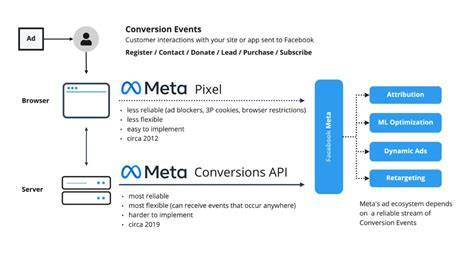
Facebook Pixel tracks user actions by running JavaScript in the browser, sending information like page views or purchases back to Meta. This means Pixel's data depends on the browser environment, user settings, and can be blocked by ad blockers or tracking prevention features in browsers.
Meta Conversion API works differently by sending events directly from your server to Meta's servers. So, instead of relying on what happens in the browser, your website's backend reports events like purchases independently. This server-side tracking isn’t affected by browser controls or ad blockers the way Pixel is.
In essence, Pixel listens to the user’s browser activity, while Conversion API communicates directly from your server. Both capture similar events but through these different paths, providing complementary tracking methods.
Why should I consider switching from Facebook Pixel to Meta Conversion API?
Tracking only with Facebook Pixel can lead to gaps or inaccuracies, especially as browsers restrict cookie use and block scripts more aggressively. Meta Conversion API fills these gaps by offering a direct, reliable data flow from your server, making it less likely to miss conversions.
Because the data comes from your backend, you can send richer details like customer IDs or subscription information that Pixel might not capture. This leads to better targeting and smarter budget decisions.
Conversion API also helps future-proof your tracking against evolving privacy rules and browser restrictions. While Pixel remains useful, Conversion API provides a stronger, more dependable foundation for tracking and attribution.
What problems with Facebook Pixel does Meta Conversion API help fix?
Facebook Pixel faces common issues like being blocked by ad blockers or limited by browser tracking prevention in Safari and Firefox. These restrictions cause some user actions to go untracked, resulting in incomplete conversion data.
By shifting tracking to your server, Conversion API avoids these blocks because the data is sent directly to Meta, bypassing the user’s browser environment. This reduces lost data and helps capture conversions even when Pixel is blocked.
It also reduces discrepancies between reported conversions and actual sales, giving you clearer insights into ad performance. However, Conversion API can’t track events that don’t happen or aren’t recorded on your server—it mainly addresses the blind spots caused by browser or ad blocker interference.
How does Meta Conversion API improve data privacy and compliance?
Privacy laws like GDPR and CCPA require careful handling of user data and consent. Facebook Pixel relies on cookies and browser scripts, which can be limited by browser settings and consent pop-ups.
Conversion API sends data from your server, giving you more control over what information you share and when. You can ensure only data with proper user consent is sent and manage personally identifiable information more securely. This clear, server-side data flow aligns better with privacy requirements and is easier to audit.
Because it doesn’t rely on third-party cookies, Conversion API fits better with modern browser policies that restrict cookie use. That said, you still need to collect and manage user consent properly—Conversion API doesn’t replace that responsibility.
Will my ad tracking and attribution be more accurate with Meta Conversion API?
Meta Conversion API generally improves tracking accuracy because the data comes directly from your server, unaffected by browser restrictions or ad blockers that might block Pixel events.
For example, if a customer buys something with an ad blocker active or disabled cookies, Pixel might miss the sale, but Conversion API can still report it since your server records the transaction.
More complete and reliable data helps Meta attribute conversions correctly, improving campaign optimization and budget use. Keep in mind, accuracy depends on your server’s data quality and correct setup—Conversion API can’t fix incomplete or delayed backend data.
Do I have to pick only one — can I use both Facebook Pixel and Meta Conversion API together?
You don’t need to choose between them. Using Facebook Pixel and Meta Conversion API together usually gives the best results.
Pixel captures real-time client-side events, while Conversion API fills gaps by sending server-side data. Running both helps you capture the full range of user actions. If one method misses an event because of browser blocks or network issues, the other might still catch it.
This dual setup lets Meta cross-reference data streams, which improves attribution and ad performance without losing the benefits of either method.
What technical skills or resources do I need to implement Meta Conversion API?
Implementing Meta Conversion API requires some developer involvement since it involves server-side coding and API integration. Your server needs to communicate with Meta’s API to send event data like purchases or leads.
Some platforms or CMSs offer plugins that simplify setup, but understanding APIs, server requests, and data privacy is helpful. A developer will map your website or app events to the API format and handle authentication.
If you lack technical resources, consider hiring a developer or consultant. The effort is often worthwhile given the improvements in data quality and campaign insights.
Conclusion
Start by adding Meta Conversion API alongside your existing Facebook Pixel instead of replacing it. This combination addresses many tracking challenges, improves data accuracy, and keeps real-time browser insights intact. Focus on mapping your key conversion events correctly with your developer. Remember, better tracking is a gradual process, not an overnight fix. Over time, you’ll see smoother attribution, fewer missed conversions, and more confidence in your ad decisions. When your campaign data better matches actual sales, you’ll know Conversion API is working well.
Frequently Asked Questions
Can I use Meta Conversion API without Facebook Pixel?
Yes, you can use Conversion API alone, but combining it with Facebook Pixel usually gives you more complete data. Pixel captures client-side interactions in real time, while Conversion API ensures server-side events are reported even if Pixel is blocked.
Does Meta Conversion API comply with privacy laws like GDPR?
Conversion API helps with compliance by giving you better control over what data you send and when, making it easier to respect user consent. However, you still need to properly manage consent and data handling on your side.
Is Meta Conversion API difficult to implement?
Implementation typically requires developer work because it involves server-side setup and API integration. Some platforms offer plugins to simplify this, but having technical resources is important to set it up correctly.
Will Conversion API improve my ad performance immediately?
Improvements usually take time because better data helps Meta optimize your campaigns more effectively. You might not see instant results, but over a few weeks, more accurate tracking can lead to better targeting and higher return on ad spend.
What types of events can I track with Meta Conversion API?
You can track standard events like purchases, leads, registrations, and page views. Since the data comes from your server, you can also include custom parameters that clarify user behavior and improve targeting.