Google PPC ads let you create ads that show up when people search on Google, and you only pay when someone clicks your ad. This means you can control your budget and reach customers already interested in what you offer. If you’re a small business owner feeling overwhelmed by jargon and options, this guide will help you set up your Google Ads account, pick keywords that actually convert, write ads that attract the right clicks, set sensible budgets, and track your results to grow your online sales.
What exactly are Google PPC ads and how do they work?
Google PPC (pay-per-click) ads are online ads that appear in Google search results or on partner sites. You bid to have your ads shown for specific search terms, but you only pay when someone clicks your ad. This differs from traditional ads where you pay just for showing up. When someone searches for keywords related to your business, Google runs an auction between advertisers targeting those words. Ads with better relevance and quality rank higher and often cost less per click. For small businesses, PPC ads help you reach people actively searching for what you sell, making it an efficient way to drive sales or leads quickly.
How do I create my first Google Ads account and navigate the dashboard?
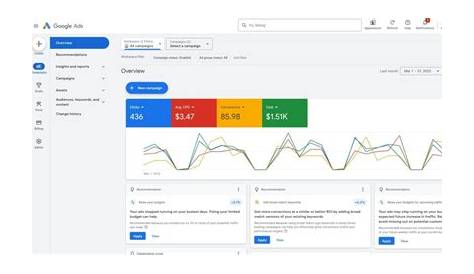
To start, go to ads.google.com and sign in with your Google account or create one. Google will offer a setup wizard for your first campaign, but you can skip it to explore the full dashboard. The dashboard might look busy at first, but it’s organized into clear parts: Campaigns, Ad Groups, Ads & Extensions, and Keywords. Campaigns set your overall budget and targeting options. Inside each campaign, ad groups organize related keywords and ads by theme. The dashboard shows key metrics like clicks, impressions, and costs. Spend some time clicking through to understand where to find information about how much you’re spending and how your ads are performing.
Which keywords should I pick to get the most value from my budget?
Pick keywords that show clear buying intent rather than just popular search terms. For example, if you sell handmade candles, "buy scented candles online" is more likely to lead to sales than just "candles." Use Google’s Keyword Planner to find keywords, see competition, and estimate costs. Avoid broad terms that attract uninterested clicks, which waste your budget. Focus on specific phrases and use negative keywords to block irrelevant searches. For instance, if you don’t sell wholesale, add "wholesale" as a negative keyword so your ads won’t appear for those searches. This keeps your budget focused on people ready to buy.
How should I organize campaigns and ad groups so my ads stay focused?
Organize your campaigns and ad groups clearly to improve ad relevance and lower costs. Think of a campaign as a broad goal or product category, like "Spring Sale" or "Men’s Running Shoes." Inside each campaign, create ad groups centered on a specific set of related keywords and ads. For example, within "Men’s Running Shoes," an ad group might focus on "trail running shoes." This lets you write ad copy that matches the keywords closely, making your ads more relevant to searchers. Mixing unrelated keywords in one ad group lowers your quality score and can increase costs. A clear structure also makes it easier to track performance and make improvements.
What makes ad copy compelling enough to get clicks and conversions?
Effective ad copy speaks directly to what your customers want and tells them what to do next. Start with a headline that includes your main keyword and a clear benefit, like “Buy Handmade Scented Candles – Free Shipping Today.” Use the description to highlight what makes your product special, any deals, and a call to action such as “Shop Now” or “Order Today.” Avoid vague language and focus on details that matter to your customers. Make sure your landing page delivers on the promises in your ad. Ads that meet expectations tend to get more clicks and better conversions.
How do I set daily budgets and bids without wasting money?
Begin with a daily budget you’re comfortable spending while you learn, such as $5 to $10 per day. Google won’t charge you more than your daily budget. For bids, you can choose manual or automated options. Automated bidding like “Maximize Clicks” can help if you’re unsure what to set, as Google adjusts your bids to get the most clicks within your budget. As you gather data, switch to manual bidding to raise bids on keywords that convert well and lower or pause those that don’t. Keep an eye on your cost per click and overall spend to avoid surprises. Starting small and adjusting based on actual results is safer than guessing your ideal bids.
How can I track if my ads are actually bringing in leads or sales?
Clicks alone don’t show if your ads are making sales or leads. Set up conversion tracking in Google Ads to measure actions like purchases, form submissions, or phone calls. You do this by adding a small code snippet (conversion tag) to your website or linking Google Ads with Google Analytics. Once tracking is active, you’ll see metrics like conversion rate, cost per conversion, and which keywords or ads perform best. Focus on these numbers rather than just clicks or impressions to judge your ads’ effectiveness. This information helps you decide what to improve or stop.
What are some common mistakes to avoid when launching Google PPC campaigns?
New advertisers often make mistakes that waste money or limit results. One mistake is targeting keywords that are too broad, causing irrelevant clicks. Not using negative keywords lets unwanted traffic drain your budget. Writing generic ads without clear offers or calls to action can lower engagement. Sending visitors to a landing page that doesn’t match your ad’s promise hurts conversions. Also, setting a budget and forgetting to monitor performance can lead to overspending on poor-performing ads. Taking time to organize campaigns, write focused ads, and check results regularly helps avoid these issues.
How do I optimize my campaigns over time for better ROI?
Optimization means using your campaign data to improve performance and get better returns. Look at which keywords, ads, and ad groups have the best conversion rates and cost per conversion. Pause or lower bids on those that underperform. Test different ad copy to find what resonates with your audience. Adjust bids based on when, where, and how people search if you notice patterns in your data. Keep adding negative keywords to block irrelevant searches. Optimization isn’t a one-time task—it’s about testing and tweaking to make the most of your budget.
What next steps should I take after my first campaign to keep improving?
Once your first campaign is running and you have some data, keep experimenting. Expand your keywords with related phrases or try different ad formats like responsive search ads. Explore advanced features like remarketing, which targets people who visited your site but didn’t buy. Check your metrics regularly and make small, steady changes instead of big overhauls. Learning from each campaign helps you improve over time. When you’re ready, consider advice from PPC experts or joining online groups where you can exchange tips. Staying curious and patient is key—effective Google PPC advertising grows with practice.
Conclusion
Start by creating your Google Ads account and focus on a small, well-organized campaign with carefully chosen keywords. Skip complicated features until you understand ad groups, bidding, and conversion tracking. A good early sign is steady clicks from relevant searches and some conversions at a cost you can manage. From there, watch your data, adjust bids, and test different ads. Avoid broad targeting and keep an eye on your budget. With patience and simple improvements, Google PPC can reliably bring customers to your business and help it grow.
Frequently Asked Questions
How much should I budget for my first Google PPC campaign?
It depends on your industry and goals, but starting with a daily budget as low as $5 to $10 can help you gather useful data without risking too much. You can always increase your budget as you learn what works.
What’s the difference between broad match and exact match keywords?
Broad match lets your ads show for a wide range of related searches, which can bring more traffic but less precise targeting. Exact match restricts ads to searches that match your keyword exactly or very closely, helping focus on highly relevant clicks.
Do I need to hire a professional to manage my Google Ads?
You don’t have to. Many small business owners successfully run their own campaigns by learning the basics, starting small, and using Google’s tools. However, as your campaigns grow or become more complex, professional help can save time and improve results.
How long does it take to see results from Google PPC ads?
You can start seeing clicks immediately once your ads are live, but steady leads or sales usually take a few weeks as you collect data and optimize your campaigns.