A Google Ads product feed is a detailed file listing all your ecommerce products—titles, prices, images, availability, and more. It’s the core data Google uses to create Shopping ads and other dynamic ad formats that show your products to shoppers actively searching for items like yours. Without an accurate, well-organized product feed, your ads won’t reach the right customers effectively, leading to lost sales and wasted ad spend. Understanding and optimizing your product feed is key to improving your Google Ads results and growing your online store.
What is a Google Ads product feed, really?
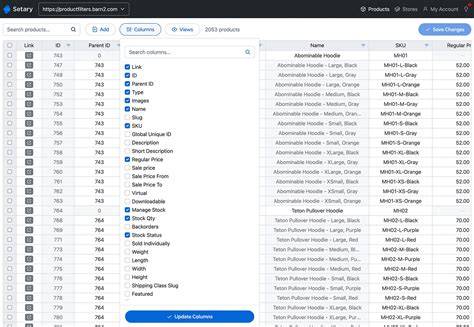
A Google Ads product feed is a structured file—often a spreadsheet or XML—that lists every product you sell along with important details like product title, description, price, image link, availability, brand, and unique identifiers such as GTIN or MPN. Think of it as your digital catalog that Google reads to understand what products you offer. This feed powers Google Shopping ads by enabling Google to display your products directly in search results with images, prices, and other relevant details shoppers expect. Without a product feed, you can’t run Shopping campaigns, limiting your ads to text-only formats that usually don’t perform as well for ecommerce stores.
Why should ecommerce stores care about the product feed?
Your product feed is the foundation of your Shopping ads. If the data is inaccurate, incomplete, or disorganized, your ads might not show at all or could display wrong information, confusing potential buyers. For example, if a shopper searches for a red running shoe but your feed incorrectly labels it as blue, you lose that sale. In contrast, a well-maintained feed helps your products appear in the right searches with accurate details, increasing click-through and conversion rates. Clear pricing, current availability, and correct descriptions build trust and encourage purchases. Simply put, the quality of your product feed directly impacts your ad visibility, relevance, and ultimately your sales.
What data fields are most important in a product feed?
Certain fields in your product feed have a big impact on how well your ads perform. The product title is critical since it’s often the first thing shoppers notice; it should be clear, descriptive, and include relevant keywords without keyword stuffing. The description adds useful detail but should stay focused and natural. Price is vital—if it’s wrong or doesn’t match your website, Google may disapprove your ads, and customers may get frustrated. Availability status tells Google if a product is in stock, out of stock, or available for preorder, preventing wasted ad spend on unavailable items. Unique product identifiers like GTINs help Google correctly categorize your products and improve ad relevance. High-quality image URLs matter because shoppers rely heavily on visuals when deciding what to buy. Missing or incorrect information in any of these fields can reduce your ads’ reach or cause your feed to be disapproved.
How does Google use your product feed in ads?
Google uses your product feed to dynamically match your products with relevant search queries. When someone searches for an item, Google scans your feed’s titles, descriptions, and identifiers to find the best matches. It then creates an ad featuring the product image, price, and your store name. This means you don’t have to create separate ads for every product or keyword—the feed data does the work. Better feed data leads to more accurate product matches, increasing clicks and sales. Google also updates ads automatically when you change prices or availability in your feed, keeping your ads current without extra effort.
What are the most common product feed setup mistakes?
Many stores struggle with product feeds because of avoidable errors. Common mistakes include missing required fields like price or availability, which can lead to disapproved products or feeds. Outdated information—such as prices or stock levels that don’t match your website—causes ads to be rejected or confuse shoppers. Inconsistent pricing between your site and feed is a frequent issue. Vague or keyword-stuffed titles and descriptions reduce ad relevance. Failing to include unique identifiers like GTINs makes it harder for Google to classify your products correctly. Broken or low-quality image URLs also hurt your ads. Avoiding these pitfalls helps ensure your ads run smoothly and perform well.
How can you create or improve your product feed?
Creating a solid product feed starts with gathering all your product details in one place. Your ecommerce platform may offer an export feature to generate a feed, or you can build one in a spreadsheet. Include all required fields: product ID, title, description, product link, image link, price, availability, and unique identifiers. Organize your data clearly and verify its accuracy. Upload your feed to Google Merchant Center, which provides immediate feedback on errors or missing information. For large catalogs, automated feed management tools or ecommerce plugins can update your feed regularly without manual effort. Regularly review and fix any warnings or disapprovals. Improving product titles and descriptions by making them clear and relevant helps Google match your ads better. The key is to keep your feed complete, accurate, and up to date for the best ad results.
How does the product feed fit into different Google Ads campaigns?
Your product feed is essential for several Google Ads campaign types, especially Shopping campaigns and dynamic remarketing. Shopping campaigns use the feed to create product listings that show images, prices, and details directly in search results, giving shoppers a rich preview before they click. Dynamic remarketing campaigns rely on your feed to show ads featuring products shoppers have already viewed, making those ads more personalized and effective. Some display campaigns also use feed data to show relevant products based on user behavior. Without a product feed, you can’t run Shopping campaigns or personalized product retargeting ads. So, the feed is the backbone for multiple ad formats that can drive ecommerce sales.
How do you keep your product feed accurate and up to date?
Keeping your product feed current is critical to avoid ad disapprovals and maintain performance. Automate feed updates whenever possible—many ecommerce platforms and feed management tools can sync your inventory, prices, and product details with Google Merchant Center on a schedule. If your catalog changes often, daily or more frequent updates help keep your ads accurate. Regularly check your Merchant Center account for errors or warnings and fix them promptly. Have a process to verify key fields like prices and availability, especially during sales or when stock fluctuates quickly. Remove discontinued products from your feed promptly to avoid showing ads for items no longer available. Staying on top of feed updates reduces wasted ad spend and keeps customers satisfied with accurate info.
What should you watch out for as your product catalog grows?
As your product catalog grows, managing your feed becomes more challenging. Large inventories can slow processing and increase errors if data isn’t standardized. Handling product variants like different sizes or colors requires clear, consistent naming and attributes so Google can distinguish them correctly. Maintaining high data quality is crucial—more products mean it’s easier for some listings to have missing or incorrect info, which can hurt your overall ad account health if errors accumulate. You might need to refine your feed structure or use custom labels to organize products for specific bidding strategies or campaigns. Investing in specialized feed management tools or services can save time and keep your data clean as you grow. The goal is to maintain a detailed, well-organized feed even as your store expands.
Conclusion
Start by reviewing your current product feed to ensure it includes all required fields and matches your website’s information. Focus on getting titles, prices, and availability right since these have the biggest impact on your ads. Don’t try to fix every detail at once; prioritize major errors or missing data first. Use Google Merchant Center’s tools to spot issues and schedule regular feed updates through your ecommerce platform or feed tools. A clean, accurate feed helps your products show up for the right shoppers, boosting clicks and sales. As your store grows, keep monitoring feed quality and automate updates as much as possible—the effort pays off with better ad performance and increased revenue. Making your product feed a priority is one of the simplest ways to improve your Google Ads results.
Frequently Asked Questions
Can I run Google Shopping ads without a product feed?
No. A product feed is required for Google Shopping ads because it provides Google with the product details needed to create those ads. Without it, you can only run text-based ads, which generally don’t perform as well for ecommerce.
What happens if my product feed has errors?
Errors such as missing prices or incorrect availability can cause Google to disapprove your products or the entire feed, preventing your ads from showing. Even if your ads run, inaccurate data can confuse customers and lower your chances of making sales.
How often should I update my product feed?
Ideally, update your feed daily or whenever you make important changes to prices, stock, or product details. Frequent updates keep your ads accurate and help avoid disapprovals caused by outdated information.
What tools can help me manage my product feed?
Many ecommerce platforms have built-in feed export features. There are also third-party feed management tools that automate updates, check for errors, and help optimize your feed. Google Merchant Center itself offers diagnostics to help you manage your feed effectively.
How does a good product feed improve my Google Ads performance?
A well-organized and accurate product feed helps Google match your products to relevant searches, improving ad visibility and relevance. This leads to more clicks and higher conversion rates, making your ad spend more effective.