UTM parameters are little tags you add to the end of URLs to track where your website visitors come from and which marketing efforts bring results. To create them correctly, you need to use the right format and consistent naming conventions so your analytics tools can accurately report on your campaigns. When set up properly, UTM parameters give you clear data on which ads, emails, or social posts are driving traffic and conversions, helping you make smarter marketing decisions.
What exactly are UTM parameters and why should I care?
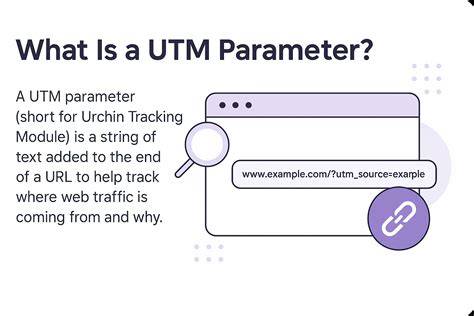
UTM parameters are small pieces of text added to the end of a URL that tell your analytics software exactly where traffic is coming from. Think of them as labels attached to a link. For example, if you run a Facebook ad, adding UTM parameters to that ad’s URL lets your analytics identify the visit as coming from Facebook and from that specific campaign. Without UTM parameters, traffic might show up as "direct" or "referral," which doesn’t reveal which channels or ads are actually performing. Correctly using UTMs gives you detailed insights so you can optimize your marketing efforts based on real data.
Which UTM parameters are essential and what do they mean?
There are five main UTM parameters, but usually only three are required for basic tracking:
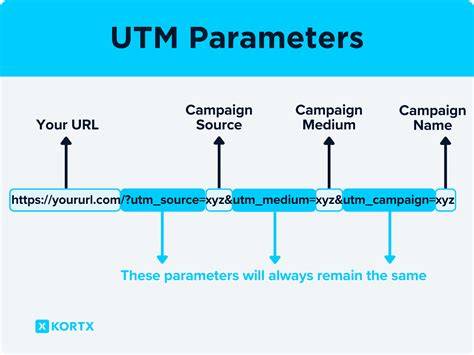
- utm_source: Identifies the traffic source, such as "facebook", "newsletter", or "google". This tells you where visitors came from.
- utm_medium: Describes the marketing channel or medium, like "cpc" for paid ads, "email" for campaigns, or "social" for organic posts.
- utm_campaign: Names the specific campaign, for example, "spring_sale" or "product_launch".
The two optional parameters are:
- utm_term: Used mainly for paid search campaigns to track the keyword that triggered the ad.
- utm_content: Differentiates similar links within the same campaign, such as two different ads or call-to-action buttons.
For example, a URL like example.com?utm_source=facebook&utm_medium=cpc&utm_campaign=spring_sale shows traffic from a Facebook paid ad for the spring sale campaign.
How do I format UTM parameters correctly in a URL?
UTM parameters are added to URLs starting with a question mark (?). Each parameter is a key-value pair joined by an equals sign (=), and multiple pairs are separated by ampersands (&). For example:
example.com?utm_source=twitter&utm_medium=social&utm_campaign=launch
Avoid spaces in parameter values—use underscores or dashes instead. Don’t include special characters like question marks or ampersands within values, as these can break the URL. If you must include spaces or special characters, use URL encoding (for example, replace spaces with %20), but simpler names are easier to manage. Only add the question mark once at the start of the parameters; subsequent parameters use ampersands.
What common mistakes should I watch out for?
A frequent mistake is inconsistent naming, like using "Facebook" in one link and "facebook" in another. This splits your data in analytics and makes reporting confusing. Mixing uppercase and lowercase letters can cause the same problem. Forgetting to include required parameters—especially utm_source—means visits won’t be properly tracked.
Using spaces or special characters in parameter values can break URLs or cause tracking errors. Overloading URLs with unnecessary or duplicate parameters can confuse analytics tools. Another common issue is lacking documented naming conventions, which leads to inconsistent links when multiple people create them without coordination.
How do I decide on consistent naming conventions for UTM parameters?
Consistency is crucial for reliable data. Establish a clear naming scheme before you start creating links and stick with it. Use lowercase letters only, with no spaces or special characters. For utm_source, use standard names like "facebook", "google", or "linkedin". For utm_medium, pick from a short list such as "cpc", "email", "social", or "referral".
For utm_campaign, use descriptive but concise names that include the campaign theme and date or season, like "summer_sale_2024". When you have multiple ads or links under one campaign, use utm_content to distinguish them, like "ad1" and "ad2".
Document these rules in a shared file or guide so everyone on your team follows the same format. This helps avoid messy data and makes reporting much easier.
When should I use utm_term and utm_content?
Use utm_term mainly for paid search campaigns to track which keywords triggered your ads. For example, if you run Google Ads for "running shoes," you might add utm_term=running+shoes to see which search terms bring visitors.
Use utm_content when you have multiple links pointing to the same URL within a campaign and want to tell them apart. For example, if you run two banner ads or two call-to-action buttons in one email, utm_content=button1 and utm_content=button2 help you see which performs better. It’s also great for A/B testing different creatives or placements.
If your campaign doesn’t have multiple versions or keywords to track, you can leave these parameters empty.
Can I create UTM parameters for offline campaigns or emails?
Yes, you can and should use UTM parameters in emails and offline campaigns, though with some adjustments. For emails, add UTM parameters to every link so you can track which email or newsletter drove traffic. For example, use utm_source=newsletter and utm_medium=email.
For offline campaigns like printed flyers, posters, or QR codes, create URLs with UTM parameters embedded, then generate QR codes linking to those URLs. When someone scans the code, your analytics will capture the traffic source. Remember, UTM parameters only work when the link is clicked or scanned—they don’t track offline behaviors directly.
Keep offline URLs simple and short to reduce typing errors if people type them manually.
What are the best tools to help me build and manage UTM parameters?
Several tools make creating UTM parameters easier. Google’s Campaign URL Builder is a free and straightforward option where you fill in fields and it generates your URL. Tools like UTM.io and Terminus offer advanced features such as enforcing naming conventions, managing links, and enabling team collaboration.
Many marketers keep a spreadsheet to document all UTM parameters used, tracking source, medium, campaign names, dates, and notes. This helps avoid duplicates and naming errors. Choose a tool everyone on your team can access and knows how to use. A well-organized UTM management process prevents messy data and saves time during reporting.
How do I test if my UTM parameters are working correctly?
After creating a URL with UTM parameters, test it by clicking the link yourself and checking if the parameters appear in your analytics reports. In Google Analytics, go to Acquisition > Campaigns to see if your campaign names show up correctly.
Also, check the URL in the browser to ensure the UTM parameters remain intact and aren’t stripped out by redirects. If tracking doesn’t work as expected, review your URL formatting and naming conventions. Browser extensions or link shorteners can sometimes remove parameters, so test those situations as well.
Testing each new campaign URL before wide distribution helps catch errors early.
What should I do next once I’ve created my UTM parameters?
After creating your UTM parameters, share your naming conventions and guidelines with your entire marketing team to keep everyone aligned. Document these rules in a shared space like a team wiki or shared document.
Regularly audit your campaign links to catch mistakes or inconsistencies before they affect your data. Encourage teammates to use your chosen tools or templates for building URLs.
Over time, maintaining a clean and consistent UTM system will help you analyze campaign performance with confidence, allocate budgets wisely, and prove the impact of your marketing efforts.
Conclusion
Pick a simple, consistent naming scheme for your UTM parameters and stick to it. Use lowercase letters without spaces or special characters. Build your URLs carefully with the right syntax, and test them before sharing. Don’t forget to document your naming rules and share them with your team—this keeps your data clean and meaningful. When your campaign data is clearly attributed, you can focus on what’s driving results instead of chasing confusing numbers. Avoid overly complicated UTM setups that don’t fit your needs and prioritize clarity and consistency instead.
Frequently Asked Questions
Can I use uppercase letters in UTM parameters?
It’s best to use lowercase letters consistently for all UTM parameter values. Mixing uppercase and lowercase can make analytics treat the same source or campaign as different entries, splitting your data.
Do I need to use all five UTM parameters every time?
No. Usually, only utm_source, utm_medium, and utm_campaign are required. utm_term and utm_content are optional and mainly useful for tracking paid search keywords or distinguishing similar ads or links within a campaign.
Will UTM parameters affect my website’s SEO?
UTM parameters don’t directly affect SEO rankings since they’re just tracking tags. However, if search engines index multiple URLs with different UTMs, it can cause duplicate content issues. To prevent this, block indexing of URLs with UTMs or use canonical tags.
Can I shorten URLs with UTM parameters?
Yes. URL shorteners can work with UTM parameters and make long tracked URLs easier to share. Just make sure the shortener preserves the parameters and doesn’t remove them during the redirect.
How do I track UTM parameters in email campaigns?
Add UTM parameters to all links in your emails to track which emails or campaigns drive traffic. Use utm_source=email and utm_medium=email, combined with a utm_campaign name for each email blast or newsletter.