Click ads are a simple way to advertise your small business online by paying only when someone clicks your ad. This means you pay for actual interest, not just for people who see your ad but don’t act. If you’ve heard about click ads but feel overwhelmed, this guide will explain exactly what they are, how they work, how to set up your first campaign, and how to get the best results without wasting money.
What are click ads and why should I care?
Click ads, also known as pay-per-click (PPC) ads, are online ads where you pay only when someone clicks on them. Unlike traditional ads that charge based on how many people see them, click ads focus on getting real engagement. For a small business, this means your advertising budget goes toward people who have shown interest by clicking, rather than just random viewers. These ads can appear on search engines like Google, social media platforms such as Facebook, or other websites. They help drive visitors to your site, promote special offers, or build brand awareness. The key benefit is that click ads let you reach people who are actively interested, making your advertising dollars more effective and easier to measure.
How do click ads actually work behind the scenes?
Click ads run on systems that decide which ads to show and how much each click costs. Most platforms use a pay-per-click model where you bid on keywords or audience traits related to your business. For example, if you run a bakery and want to advertise "fresh bread," you set a bid for that keyword. When someone searches for "fresh bread," the platform holds an auction among advertisers bidding on that term. The winning ad appears, and you pay your bid amount when someone clicks your ad. But bid price isn't the only factor—the platform also looks at your ad’s quality and relevance. This means an ad that fits well and appeals to the right audience can cost less and perform better. The goal is to show your ad to people most likely to become customers, making every click count.
Which platforms offer click ads and how do they differ?
The main platforms for click ads are Google Ads, Facebook Ads, and Bing Ads, each with its own strengths. Google Ads works well for intent-based marketing, targeting people actively searching for something specific, like "plumber near me." These clicks often cost more but tend to bring visitors who are ready to buy. Facebook Ads target audiences based on interests, demographics, and behaviors, which is useful if you want to reach people who fit your ideal customer profile but might not be searching for your product right now. Bing Ads is similar to Google Ads but usually has lower competition and cost, although it reaches fewer people. The interfaces differ too: Facebook’s platform is often easier for beginners, while Google Ads offers more advanced features but can be more complex. Pick the platform where your customers spend their time and that matches your business goals.
How do I set up my first click ad campaign without feeling lost?
Begin by deciding what you want to achieve—more website visits, sales, or sign-ups. Choose the platform that fits your audience best: Google Ads for people actively searching, or Facebook for detailed audience targeting. Write clear, concise ad text or use images that highlight your offer. When setting your audience, narrow it down by location, age, or interests to avoid wasting clicks on people unlikely to buy. Set a daily budget you’re comfortable with to keep control over spending. Before launching, preview your ad and make sure your landing page matches the message. For example, if you advertise a discount on shoes, your landing page should show those shoes and make it easy to buy them. Once live, check your campaign regularly to see how it’s performing and make adjustments as needed.
What mistakes should I watch out for that drain my ad budget?
Avoid targeting too broadly—this wastes money on clicks from people who aren’t interested or can’t become customers. Don’t forget mobile users; since many browse on phones, your ads and landing pages must work well on smaller screens. Use clear calls to action—if visitors don’t know what to do next, they might leave without converting. Also, don’t "set and forget" your campaign. Monitor performance regularly so you can catch wasted spending early and adjust accordingly. Narrow your audience, test ads on different devices, and use strong calls to action like "Buy now" or "Sign up today." These steps help keep your budget focused and effective.
How can I tell if my click ads are actually working?
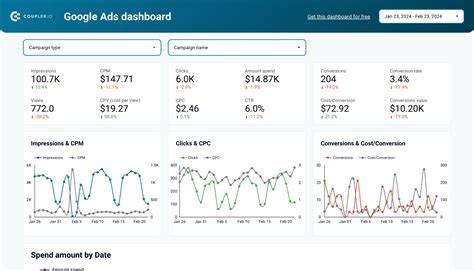
Track key numbers like click-through rate (CTR), which shows how many people clicked your ad compared to how many saw it. A low CTR can mean your ad isn’t appealing or relevant. Look at conversion rate too—what percentage of clicks lead to your desired action, like a purchase or sign-up. Cost per acquisition (CPA) tells you how much each customer costs through your ads. If CPA is higher than what you earn from a customer, you’ll lose money. Remember, lots of clicks alone don’t mean success; quality matters. If your numbers look weak, try changing your targeting, ad copy, or landing page to improve performance.
What budget should I start with and how do I avoid overspending?
Start with a small daily budget that you can afford, such as $5 to $20 depending on your business size and goals. This lets you gather useful data without risking much money. Use platform tools to pace your spending so you don’t run out of money too fast. As you see which ads perform well, you can slowly increase your budget to get better results. Keep in mind that click costs vary—from a few cents to several dollars—depending on your industry and competition. Don’t raise your budget before you know what works, or you might waste money without seeing returns.
How often should I tweak or refresh my click ads?
Ads can lose effectiveness as people see the same message repeatedly, so it’s good to refresh them every few weeks or months. Watch for drops in CTR or conversion rates—that’s a sign your ad might be getting stale. Try small changes like new headlines, images, or calls to action to find what works best. Change one thing at a time so you know what makes a difference. Regular updates keep your ads fresh and help you avoid wasting money on campaigns that no longer perform well.
Can I do click ads myself or should I hire help?
You can definitely run click ads yourself, especially if you’re willing to spend some time learning and experimenting. Doing it yourself saves money and gives you direct control. But if your time is limited or your budget is larger, hiring a professional can bring expertise and save frustration. Agencies and freelancers can assist with strategy, creative work, and ongoing optimization, though they usually charge fees or take a percentage of your ad spend. If you want to save money and feel comfortable learning, starting on your own is a good choice. Just be ready to invest some time in managing and improving your campaigns.
What’s the next step after setting up my click ads?
After your ads go live, don’t just leave them running without checking in. Look at the data regularly to see which ads and audiences are working best. Boost the successful ones and pause or tweak those that aren’t delivering results. Keep testing new ideas to improve how you reach customers. Over time, you’ll gain confidence and understand what works for your business. Patience and a willingness to adjust based on real results will help your ads become a valuable part of your growth.
Conclusion
Start with a clear goal and a small budget to get comfortable with click ads. Focus on reaching the right audience with a simple, honest message that matches your landing page. Ignore flashy tricks or chasing every new feature until you’ve mastered the basics. Good results look like steady clicks from interested people and some conversions that make your spend worthwhile. Keep an eye on your data, make small improvements, and pause ads that don’t perform. With time and attention, click ads can help your business grow.
Frequently Asked Questions
How much does a click typically cost for small businesses?
Click costs vary a lot based on your industry, competition, and platform. For many small businesses, clicks range from a few cents to a few dollars. Starting with a small budget helps you learn your costs before spending more.
Can I target local customers with click ads?
Yes. Most platforms let you target specific locations like cities or neighborhoods, so your ads reach people near your business who are more likely to visit or buy from you.
Do I need a website to run click ads?
Usually, yes. Click ads typically send people to a website or landing page where they can learn more or take action. If you don’t have a website, you can start with a Facebook page or an online store as a simple alternative.
How quickly will I see results from click ads?
You might see some results within hours or days after launching your campaign. But it usually takes a week or two of data to understand what’s working well and what needs changing.
Is it better to focus on clicks or conversions?
Clicks show that people are interested, but conversions—like purchases or sign-ups—are what really matter. Track both, but optimize your ads to increase conversions, not just clicks.